
Here’s a fun, new issue with Salesforce.
When attempting to log in to a client’s org, I was presented with the following error: “Problem Verifying Your Identity. To log in, you need both a higher access level and an identity verification method. Contact your administrator to gain login access.”
It seems this is an undocumented problem that is impacting many users today.
According to colleagues who’ve contacted support, the issue is caused by MFA and Lightning login permissions overriding each other.
Until this issue is resolved, I highly recommend you log in to all your orgs ASAP, ensure you are using a passkey, and deactivate your lightning login. This is done by clicking the link “Cancel” next to “Lightning Login”.
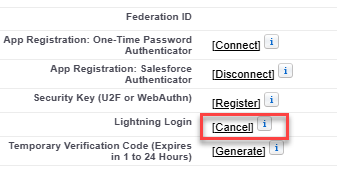
If you’re unable to log in at all, hopefully another admin can do this on your behalf.
This impacts sandboxes and production instances.
The takeaway
Another day, another Salesforce issue. Good times!